DJ.Studio Pro + Stems
Digital Download

 More info
Calculate Shipping
Digital Delivery - $0.00
Activation codes will be sent via email before close of business on the following business day, Monday through Friday.
***All activation codes will be sent via email within 8 hours, 7 days a week. Unfortunately incorrectly ordered software licenses cannot be refunded or returned***
Includes everything in the pro version as well as advanced stem separation technology.
Prepare DJ sets, create radio shows, and make DJ mixes and mashups with unparalleled speed and accuracy – all from your laptop, with no hardware required.
Effortlessly craft precise, seamless transitions using our unique timeline-based suite of DJ tools, now faster and more powerful than ever. DJ.Studio Pro + Stems 4.0 adds enhanced stem separation, more precise editing tools, and improved workflow, giving you the creative control to produce mashups and remixes at a professional level.
Whether you're a bedroom DJ or a headliner on the biggest stages, DJ.Studio provides the features you need to maximize creativity and productivity. Version 4.0 introduces faster stem processing, improved stem models, and color-coded waveforms to make mixing, editing, and mashup creation faster and more intuitive.
Until now, producing finished DJ mixes required a DJ controller and live mixing, meaning a one-hour mix took one hour of recording time – assuming no mistakes. Alternatively, you could use a music production DAW, but these have a steep learning curve and are designed for producing music, not for DJ mixing.
This is where DJ.Studio Pro + Stems Edition 4.0 comes in – a DAW for DJs, bridging the gap between traditional DJ mixing and desktop-based studio software. From music discovery, to mix editing and flexible exporting, DJ.Studio provides all the tools you need to make full, professional-sounding DJ mixes from start to finish…
Super fast DJ Mixing and Mashing with zero live fails
Create Your Playlist:
-
Import music from local libraries including iTunes, rekordbox, Serato, VirtualDJ, Mixed In Key, Engine DJ, Traktor, or browse local files (MP3, WAV, AIFF, FLAC, and more).
-
Integrated Beatport & Beatsource support allows previewing tracks before purchase, directly within Studio 4.0.
AI-Powered Playlist Ordering Assistant:
-
Harmonize your playlist using millions of calculations to perfectly order tracks by tempo and key.
-
Automix ensures musically cohesive transitions, avoiding awkward clashing keys.
-
Beat-sync tracks automatically for a flawless DJ mix with a consistent groove.
Refine Your Transitions:
-
Studio timeline editor improvements provide better visibility for cuts, duplicates, and transitions.
-
Default and custom transition presets, with curves for volume, EQ, and effects.
-
Enhanced drag-and-drop volume fade controls using new white-square handles.
Manual Automation Editor:
-
Control any parameter through the flexible timeline system.
-
Stack effects, EQ, volume, and other automation controls simultaneously.
Edit Your Tracks:
-
Cut, duplicate, or move sections to create unique, customized mixes.
-
Redesigned beat grid editor allows precise individual beat adjustments, stabilizing tempo, and overall grid control.
Enhanced Stem Separation:
-
4 new stem models provide higher-quality separation of vocals and instruments.
-
Faster stem processing: Windows 3x–10x faster, Mac M1 75% faster.
-
Stems now cover entire tracks, with volume automation lines per stem.
-
Stems are color-coded in waveforms for clarity.
-
Fully compatible with Vinyl mode for scratch and deck control.
Make Mashups and Remixes:
-
Slice and isolate drums, bass, melody, and vocals for mashups or extended edits.
-
High-quality vocal isolation for backing tracks or independent project use.
-
Improved Mashup mode: better track dragging, beat grid snapping, and workflow speed.
Extra Sample Lanes:
-
Add custom samples and sound effects for personalized mixes.
-
Loopcloud integration remains, including the free sample pack and 60-day trial.
Share Your DJ Mixes With The World:
-
Export mixes as MP3 or WAV files directly to your hard drive.
-
Export playlists as M3U files for live performances.
-
Rekordbox export includes track edits.
-
Serato export supports hot cues and track edits.
-
Ableton export included for advanced post-processing.
Beat Detection:
-
AI-powered beatgrid detection ensures precise alignment even for swing, groove, or complex breakbeats.
-
Improved 4.0 beat grid editor provides enhanced visibility, stabilization, and tempo correction.
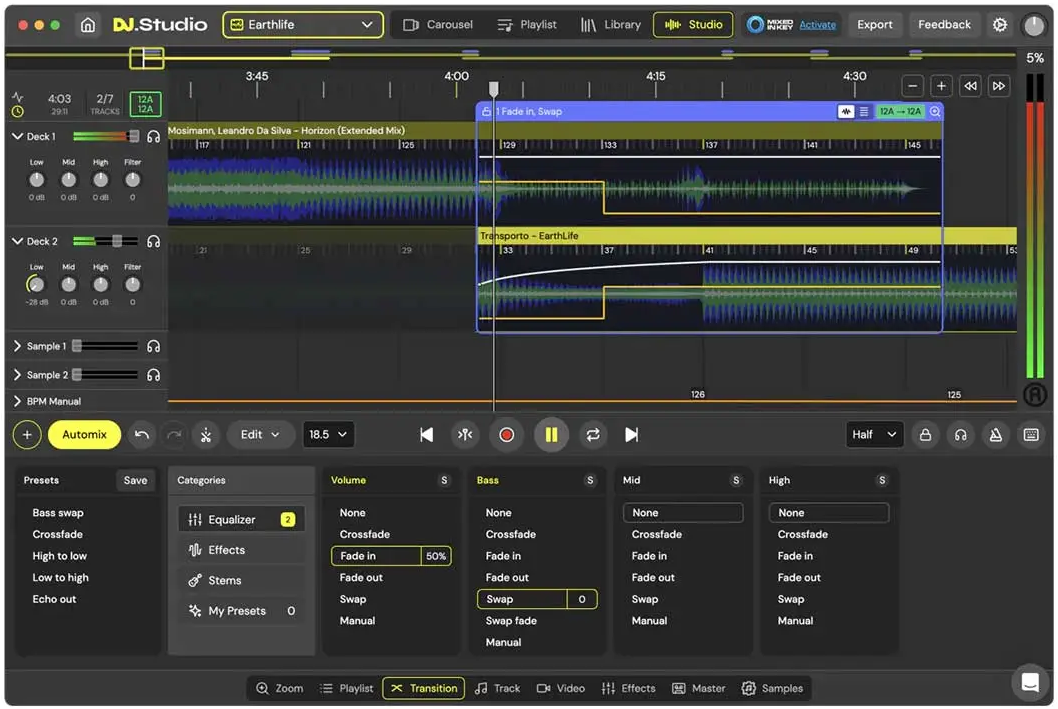
Studio View:
-
Change BPM
-
Edit your transitions
-
Default and custom transition presets
-
Apply manual automations
-
Add your own samples
-
Stem-separated transitions and volume automation per stem
-
Make mashups and re-edits with stem separation
-
Split acapella and instrumental parts from tracks
-
Export: MP3 and WAV files, DJ Set (M3U), Mixcloud, Ableton live
-
Re-pitch audio
Supported Libraries:
-
Local file downloads
-
rekordbox, Mixed In Key, Serato, Engine DJ, Virtual DJ, Apple Music, Traktor Pro, iTunes
FEATURES
-
Automix
-
Drag and drop tracks
-
Supported file types for import: WAV/AIFF/AIF/M4A/FLAC
-
Work offline
-
Intuitive mix editor
System Requirements
Mac OS X
Versions: Big Sur 11 or higher
Memory: 16 GB
Disk: 4 GB
CPU: Core processor Intel newer than 2017 or Silicon
Windows
Versions: Windows 10 or higher
Memory: 16 GB
Disk: 4 GB
CPU: Core processor Intel or AMD newer than 2017
For more information, click here to visit the manufacturers website.